
Free + Pro Works in GreetPlayer Free. Options marked Pro need GreetPlayer Pro.
GreetPlayer records how visitors use your bubbles and players, and shows it under GreetPlayer → Analytics.
Step by step
Turn on analytics and read the reports.
-
Turn tracking on
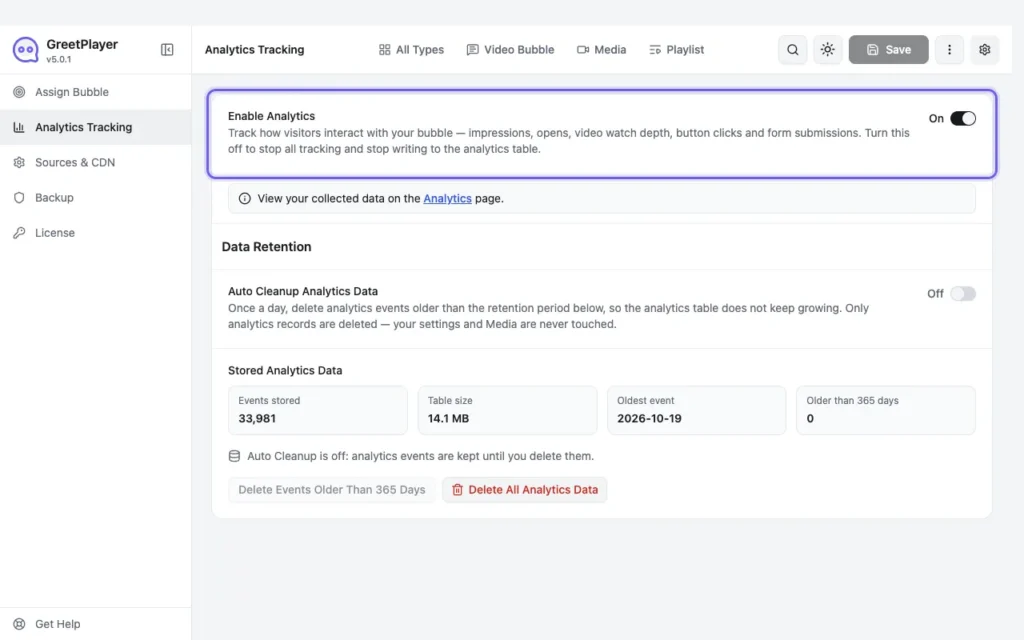
Go to GreetPlayer → Settings → Analytics Tracking and switch on Enable Analytics. Set a Data Retention period and, if you like, Auto Cleanup Analytics Data.
-
Open the reports

Go to GreetPlayer → Analytics. The overview compares Floating Bubble and Video Player totals for the chosen period, with a Performance Over Time chart.
What the numbers mean
- Visitors: browser sessions that saw a floating bubble or a video player in the period.
- Bubble Seen and Opened: how often the bubble was shown, and how often it was opened.
- Views (players): how often a player was shown.
- Plays, Completed and Completion Rate.
- Watch Time: total time watched.
- Watch funnel, top media, button performance, devices, top pages, browsers, countries and custom date ranges Pro.
Note Each visit is counted with a random session identifier, not a name or email address. Clear old data under Stored Analytics Data in the Analytics Tracking settings.
See it live Try every GreetPlayer demo →