
Free + Pro Works in GreetPlayer Free. Options marked Pro need GreetPlayer Pro.
Site-wide Bubble Visibility controls where the site-wide bubble appears. It doesn’t affect pages that have an assignment rule of their own.
Step by step
Limit where the site-wide bubble shows.
-
Choose the kinds of pages
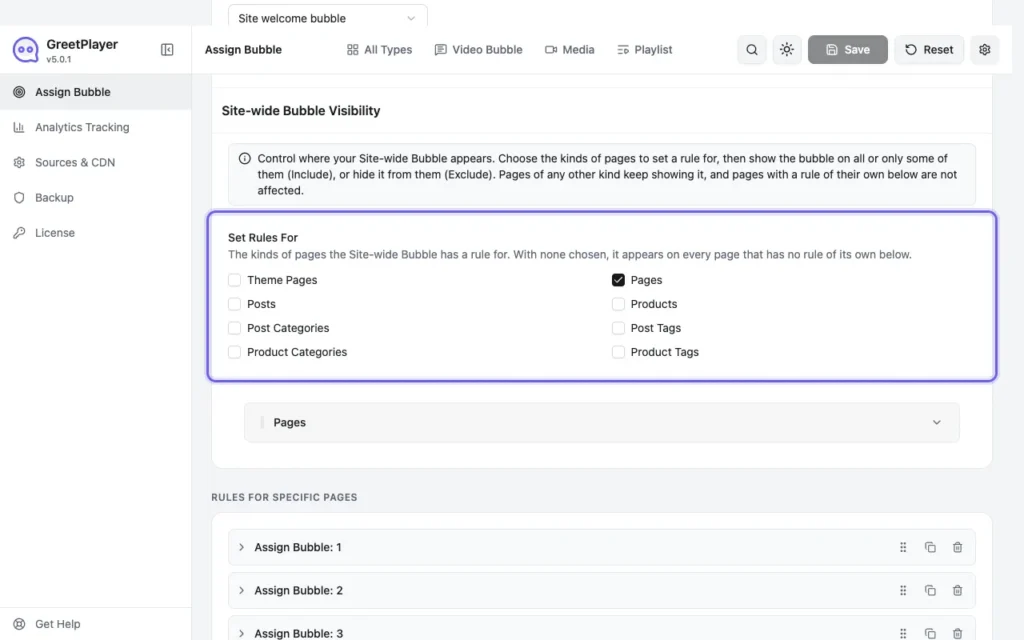
Go to GreetPlayer → Settings → Assign Bubble. Under Site-wide Bubble Visibility, tick the kinds of pages to set a rule for under Set Rules For.
-
Include or exclude
For each kind, choose Include (show only on the selected items) or Exclude (hide on them), pick the items or tick All, and click Save.
- Pages and Posts: in GreetPlayer Free.
- Theme Pages (blog, 404 and search pages), Products, Post Categories, Post Tags, Product Categories and Product Tags Pro.
Note Kinds of pages you don’t tick keep showing the site-wide bubble.
See it live See the site-wide bubble demo →