
Free Works in GreetPlayer Free and Pro.
Everything you make in GreetPlayer is a media entry on one screen: GreetPlayer → Media. There are three kinds: Video Bubble, Media (a video or audio player) and Playlist.
Step by step
Find your way around the Media screen.
-
The list
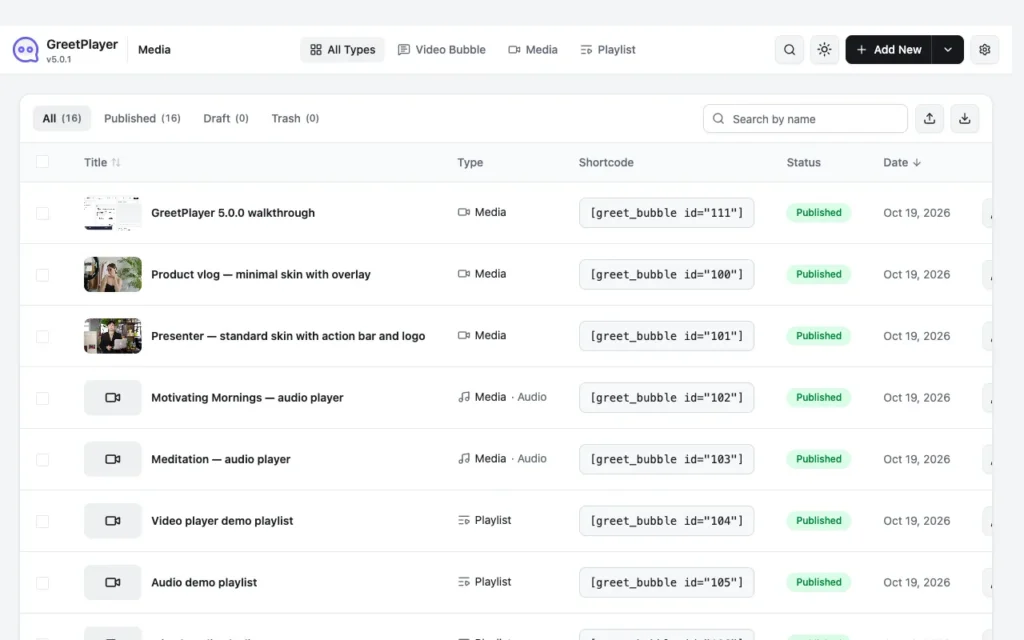
The list shows each entry’s title, type, shortcode, status and date. Filter by type with All Types, Video Bubble, Media and Playlist, or use the search box. Bulk actions, duplicate and trash are also here.
-
Add New

Click Add New to open the create dialog. Choose Video Bubble, Media or Playlist, enter a Name, pick the Source and click Create.
-
The editor

Each entry opens in an editor with sections on the left (for example General, Floating Bubble, Video Player, Player Content) and a live preview on the right. Click Publish, or Update once published, to save.
-
Copy the shortcode

Every published entry has a shortcode under How To Use This Media, for example
[greet_bubble id="54"]. Paste it into any page, post or widget area.
- Press Ctrl + K (Cmd + K on a Mac) anywhere in GreetPlayer to search the settings.
- Switch the admin between light and dark mode with the toggle in the toolbar.
- Import and export entries as CSV, XML or JSON with the buttons above the list.
See it live See what each entry type looks like →